
This is the first of three parts that describe developments related to multi-agent navigation carried out by SUPSI in the context of REXASI-PRO.
Navigation is a fundamental skill for humans, animals, and mobile robots: the ability to follow a direction while avoiding obstacles. Typically, a mobile robot uses a stack of different controllers to plan a route, execute it while avoiding obstacles, and control the speed of its motors. In this control architecture, navigation algorithms provide dynamic obstacle avoidance, interacting with the rest of the system while considering environmental conditions.
Within the context of REXASI-PRO, our primary focus lies on smart motorized wheelchairs that navigate autonomously in spaces shared with humans. Our objective is to equip these wheelchairs with the best navigation algorithms. As a first step, this requires a precise definition of what a navigation algorithm is and a way to compare different navigation algorithms. For this, we developed Navground, which stands for navigation playground. Navground defines the minimal software interface that navigation algorithms should satisfy and enables running experiments to assess their performance. The image below captures a Navground simulation of a typical REXASI-PRO scenario involving a human, a smart wheelchair, and a drone.
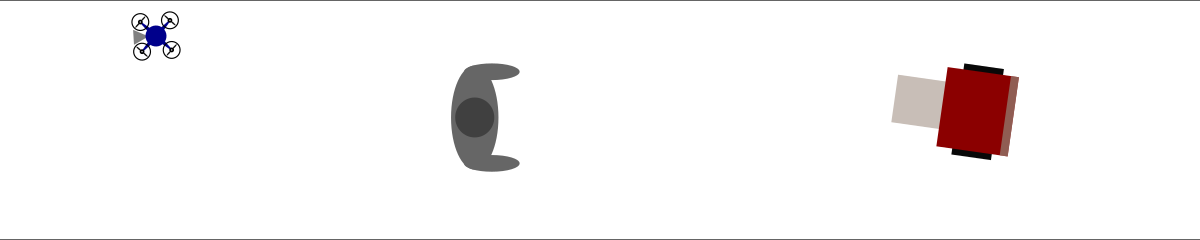
Using Navground, we can verify that an algorithm is safe by simulating extensive hours of agents navigating under the modeled environmental conditions, ensuring that no collisions occur. Similarly, we can selected the most effective algorithm, comparing performances in the same scenarios.
Navground fulfills the essential requirements for such assessments: computational costs are low (few micro-seconds per agent per update cycle, resulting in simulating one hour of navigation within a few seconds), and results are reproducible. The configuration of an experiment is user-friendly: whether via Python, C++, or YAML, users can set up complex experiments, incorporating random variability if desired, in a few lines of code. We released Navground as open source contribution. It is distributed on PyPI and supported by a comprehensive documentation that includes numerous reproducible tutorials, in which, for instance, we show how to compute the set of safe parameters for a navigation algorithm illustrated in the following plot.

Navground is modular and extensible: it defines the shape of components (the playing blocks) and implements some components while simultaneously encouraging users to contribute their own components using C++ or Python as they prefer. Python facilitates rapid prototyping algorithms that can subsequently be ported to C++ to increase computational efficiency. In particular, Navground defines the following components that users can extend:
- Navigation behaviors take into account the local environment and the agent state (position, velocity, parameters, …) to compute a velocity command towards a target.
- Behavior modulations execute before and after a behavior is evaluated: they can modify behavior parameters or computed commands.
- Kinematics models compute feasible velocities from arbitrary velocities. They act like a lower-level controller in relation to navigation behaviors.
- State estimations update the environmental state used by a navigation behavior.
- Tasks update navigation targets, functioning as higher-level controllers in comparison to navigation behaviors.
- Scenarios serve as templates for generating (potentially random) worlds during simulation.
Implemented components are documented alongside an example that demonstrates their usage. This modularity enables, for example, the application of the same navigation behavior to agents with diverse kinematics, including any kinematics that users may add by themselves.
Let us look at an instance of Navground in action to simulate a crowded plaza with numerous pedestrians and a few wheelchairs. It is configured in a YAML file; relevant snippets are displayed below.
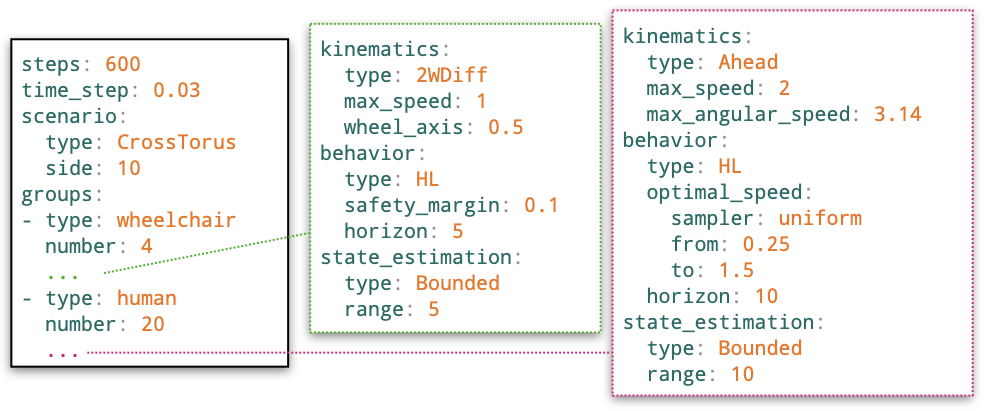
The following command executes the scenario ten times (with random initializations), storing the outcomes in a HDF5 file.

This command records the video below instead.